All platform pages

Tracking Control

Every slice of your keyword list on its own schedule. The bill follows.

A drop on your highest-volume terms is worth knowing about today. The long tail just needs a pulse. One schedule for the whole list charges you the same for both.

Custom scheduling gives every keyword set its own cadence, hourly to yearly, in as many buckets as you want. You pay for the SERPs you collect, not the number of keywords.

Start Free Trial

November 2026 played as a step sequencer. With 9,500 keywords tracked daily, every day lights every row: 285,000 SERPs a month. Split into 500 daily, 3,000 weekly on Tuesdays and 6,000 monthly, the same list takes 34,000 SERPs, 88% fewer. Then an hourly window for Black Friday, Nov 27 to Dec 1, 2026, that returns to daily on its own.

Film · 40 s

The same 9,500 keywords: 285,000 SERPs a month tracked daily, 34,000 with each set on its own schedule.

20 presets

Hourly to yearly, plus Custom for anything else

Unlimited

Keyword sets, each on its own schedule

Event windows

Set a faster cadence and its end date weeks in advance

Per SERP

You pay for the unique SERPs you collect, not the keywords

Why teams use it

How the schedule sets the bill.

01

Pay for how often you collect, not the size of your list

The calculator below runs 9,500 keywords split across daily, weekly, and monthly schedules, and comes to 34,000 SERPs a month. The same list on daily alone is 285,000.

It works the other way too. A budget of about 3,000 SERPs a month buys 100 keywords daily, 700 weekly, or 3,000 monthly. One customer tracks nearly 4,000 cities across three schedules. Adding a city to the weekly bucket costs a fraction of what adding it to daily would.

Describe what you track and see the price
The Nozzle pricing calculator with three lines, each tracking one location on mobile. Track 500 keywords daily, 15,000 SERPs a month. Track 3,000 keywords weekly, 13,000 SERPs a month. Track 6,000 keywords monthly, 6,000 SERPs a month. The total reads 34,000 SERPs a month.
MetricThree schedulesAll daily
Keywords9,5009,500
SERPs per month34,000285,000

02

Any cadence you can name

Choose from 20 presets.

  • Hourly, or every 6, 8, or 12 hours
  • Daily, every other day, or Monday, Wednesday, and Friday
  • Weekly on any day you pick
  • Twice a month, monthly, quarterly, every 6 months, or yearly

Or create your own custom schedule: the 1st, 10th, and 20th of every month, every other Monday, or every 30 minutes between 9 a.m. and 9 p.m.

A one-time collection counts too. Pull a list once, with nothing repeating after it.

How to write a custom schedule

03

Hourly for a weekend, not for a year

Black Friday, Prime Day, a product launch, a core update.

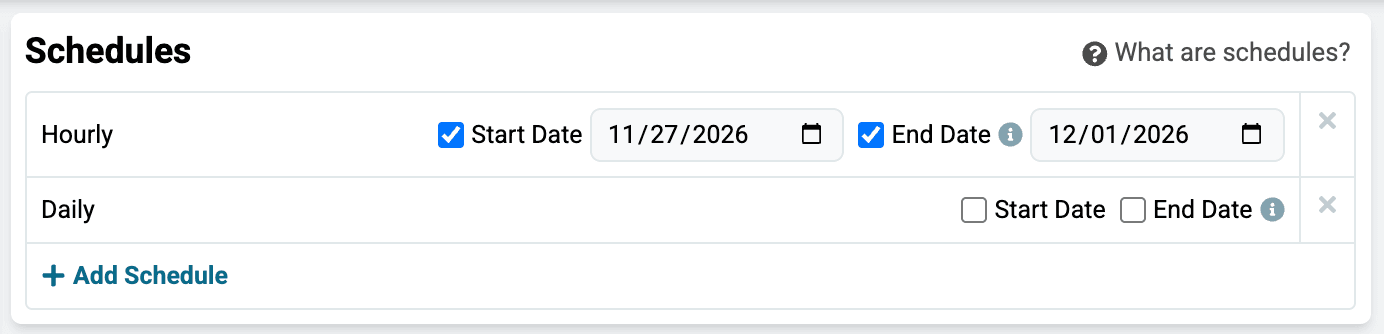
Schedule an hourly run with a start date and an end date. It starts and stops on those dates by itself, and the daily schedule is untouched. This one covers Black Friday through Cyber Monday.

How to set a tracking schedule
Schedules card for a keyword set with two rows. Hourly, with Start Date checked and set to 11/27/2026 and End Date checked and set to 12/01/2026, and Daily with no dates set. An Add Schedule button sits below the rows.

04

The list you would never track daily

Monthly or quarterly, that list becomes affordable. It is where teams put the terms that never justified a daily slot: competitor keywords, adjacent categories, everything your market types into Google.

What comes back is a map rather than a scoreboard. Which competitors show up where you have never looked, which queries trigger which SERP features, and where you do not appear at all.

Track the competitors you have not named yet

Common workflows

What this looks like in practice.

Thousands of locations on one budget

Every service in every city, or every listing in every metro. The list is generated rather than typed, and it changes every time a location opens or closes.

Each market sits in its own keyword set, on its own cadence, so tracking follows the business instead of going stale between uploads.

Tracking thousands of locations

Hourly when it counts

Ecommerce teams watch competitor promos move intraday across a sale weekend, on the few dozen terms that carry the revenue. The rest of the list never changes cadence.

Search visibility for ecommerce teams

Fresh data on report day

Pull weekly the day before the client meeting and the numbers are hours old, not a week old.

Each client's keyword sets run on their own schedules, so every retainer keeps its own budget.

How agencies run one cadence per client

Ready to explore

Stop paying daily rates for keywords you look at monthly

Give the keywords that move revenue a fast schedule, and everything else a slow one.