How do I schedule hourly tracking for a short time?
Track your keywords hourly during specific timeframes and stay on top of any changes in your rankings.
If you want to track your keywords hourly for a short time, you can set that up in the Keyword Manager.
Go to the Schedules.
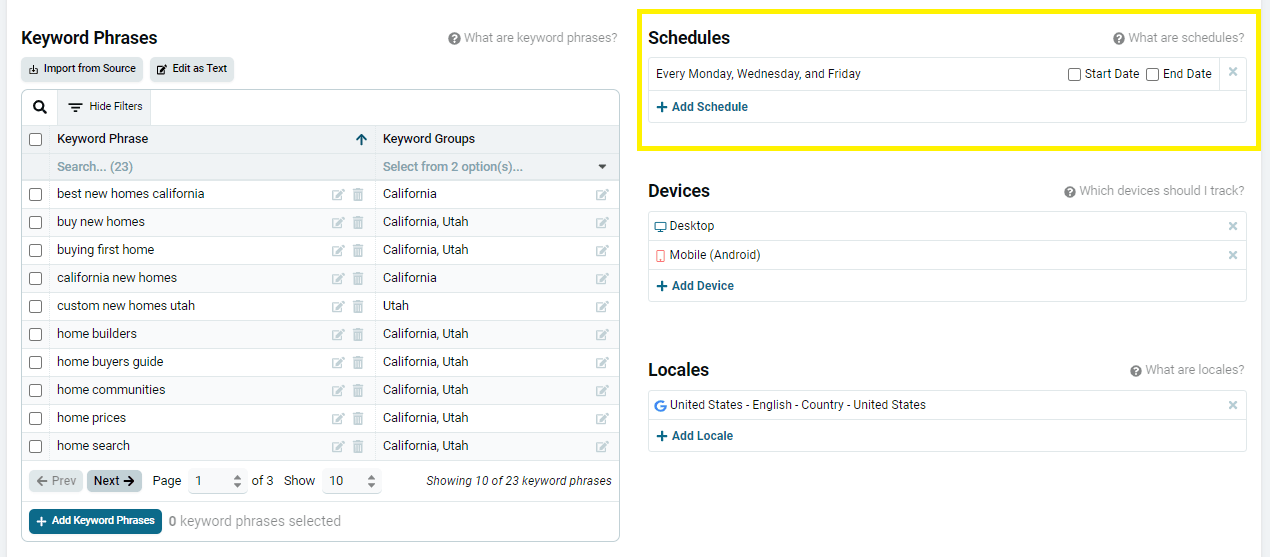
If this is a new Keyword Set, choose your normal schedule for tracking your SERPs – daily, monthly, weekly, etc. If this is a modification of an existing Set, you can change the normal schedule now, or leave it as it is.
Click +Add Schedule.
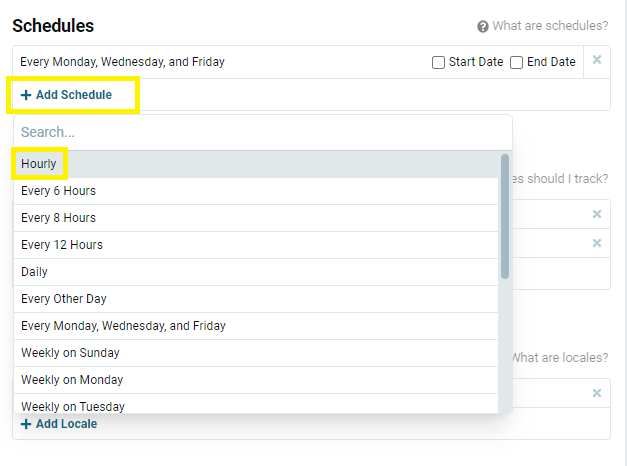
Choose Hourly in the dropdown.
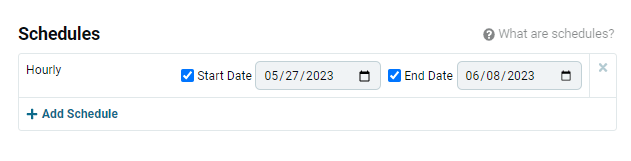
Important: choose the Start Date and End Date before you save your changes. If you only have a Start Date, you will continue to track hourly, which spends your monthly commitment quickly.
The hourly tracking will start at 12:00 am GMT on the Start date and stop at 12:00 am GMT on the End Date.
(So, in this example, it will not collect hourly data throughout the 8th, but it will stop tracking hourly at 12am that morning.)
Is hourly tracking right for you? This article explores your options so you can determine if you should schedule some hourly tracking for a short time.
Related articles